How much does a website cost in 2026? For a small business, it can mean anything from a low monthly platform fee to a five-figure professional build once design, content, SEO, integrations, and support are included.
The number itself is not the hard part. Comparing quotes is.
A $2,000 website and a $10,000 website may both have five pages and look perfectly respectable in a screenshot. But what went into those five pages can be completely different.
We build websites for a living, so yes, we know what we’re talking about. That’s also why we’d rather show you what you’re actually paying for rather than give you the usual answer of “it depends.”
Quick View
How much does a website cost for a small business?
The question “how much does a website cost?” doesn’t have one useful number. The buying model changes what you’re actually paying for.
For a typical small business, there are four common ways to pay for a website:
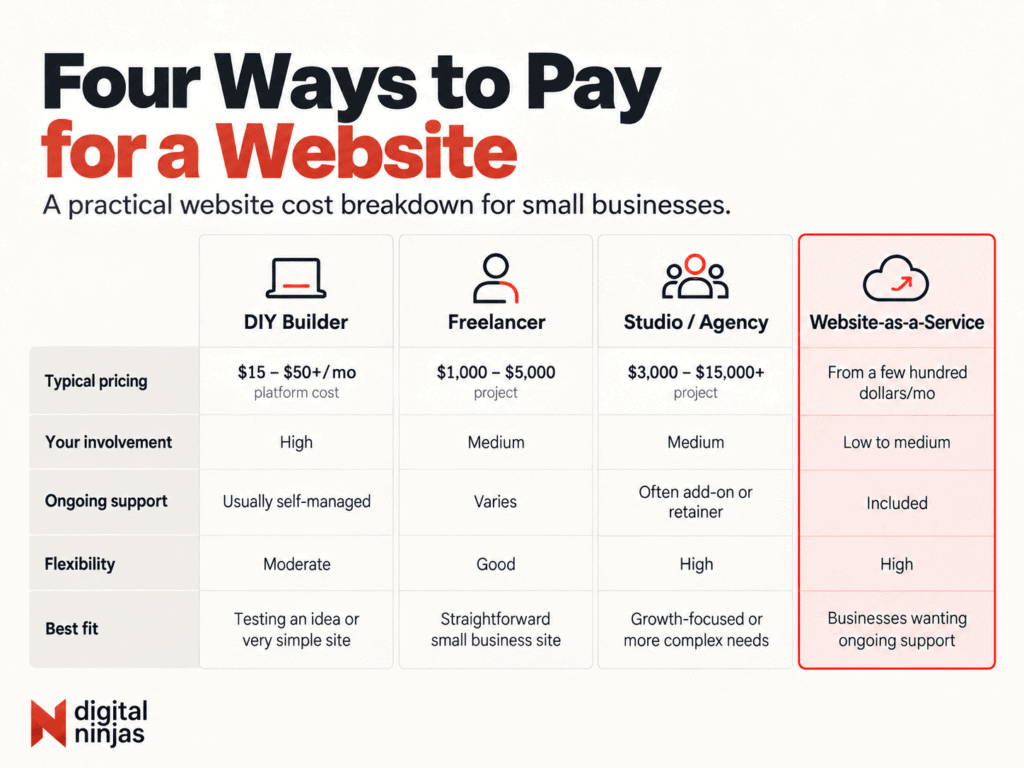
DIY website builders: roughly $15 to $50 a month
Wix, Squarespace, Shopify, WordPress.com, and similar platforms let you start without hiring a developer.
For a typical paid business plan, expect roughly $15 to $50 a month. Entry-level plans can cost less. E-commerce, advanced features, extra apps, and higher-tier plans can push the cost much higher.
The important distinction is that this is mainly the platform cost, not the value of the time you spend building the website, which is something business owners often forget to factor in.
If it takes you 40 hours to choose a template, write the copy, resize images, configure forms, learn the editor, and fix everything that looks strange on mobile, those hours are part of your website cost too.
DIY platforms also aren’t automatically bad for SEO. Most major builders now give you access to the basics, such as page titles, descriptions, redirects, structured data, and other search settings.
The catch is that having the tools and knowing how to use them are two different things.
A builder can give you a field for a title tag. It won’t decide what your site architecture should be, which searches matter to your business, how your service pages should be structured, or what content deserves its own page.
DIY makes sense when you’re testing an idea, running a very simple business, or genuinely have more time than budget.
Just go in knowing which one you’re spending.
Freelancers: roughly $1,000 to $5,000
A good freelancer can be excellent value, especially for a straightforward small business website.
You get someone to handle the technical work without paying for a larger team or agency structure. For many businesses, that’s enough.
The challenge isn’t finding someone with a nice portfolio. It’s figuring out what happens outside the portfolio.
Ask questions like:
- Will I review the website on a staging site before it goes live?
- Who owns the domain, hosting, accounts, and finished website?
- Is copywriting included, or do I provide all the content?
- What SEO work is actually part of the build?
- What happens if something breaks after launch?
- Who handles updates six months from now?
A cheap quote with clear answers can be a better deal than an expensive quote with vague ones.
The problem starts when you discover halfway through the project that “website design” meant putting your content into a template, while everything else costs extra.
Studios and agencies: roughly $3,000 to $15,000+
Once a project needs more than a basic build, pricing starts climbing.
You’re usually paying for a broader process: planning, design, development, content structure, technical setup, testing, launch support, and some level of project management.
Website costs can rise quickly when the project involves custom functionality, large amounts of content, e-commerce, integrations, migrations, or deeper SEO work.
At this level, don’t judge the quote by the number of pages alone.
A five-page site with custom positioning, original copy, keyword research, conversion planning, CRM integration, analytics, and performance testing is not the same project as five pages assembled from supplied text and a premade theme.
Location affects the invoice too.
Studios in different countries operate with different salaries, overhead, and local market rates. A remote team can sometimes offer comparable expertise at a lower cost than an agency operating in a high-cost city.
That doesn’t make offshore automatically better or local automatically overpriced.
Compare the actual work, the people doing it, the process, the ownership terms, and what happens after launch.
Website-as-a-Service: from a few hundred dollars per month
There’s another model that doesn’t fit neatly into the traditional “pay once for a website” approach.
Website-as-a-Service, or WaaS, combines the website with ongoing services under a monthly fee.
Instead of paying a large amount upfront for the build, you pay a recurring monthly fee that’s bundled with services such as hosting, maintenance, SEO, content, reporting, and ongoing support.
That makes the upfront cost easier to manage, but the right comparison isn’t just the monthly price. Look at the total commitment, what’s included, what happens after launch, and who owns the website if the agreement ends.
This model can make sense for businesses that want an ongoing digital partner rather than a one-time build.
What actually makes one website cost more than another?
If you’re starting with the question “how much does a website cost?”, page count alone won’t give you a useful answer.
Two businesses can both ask for a five-page website and receive completely different prices because page count is only one part of the job.
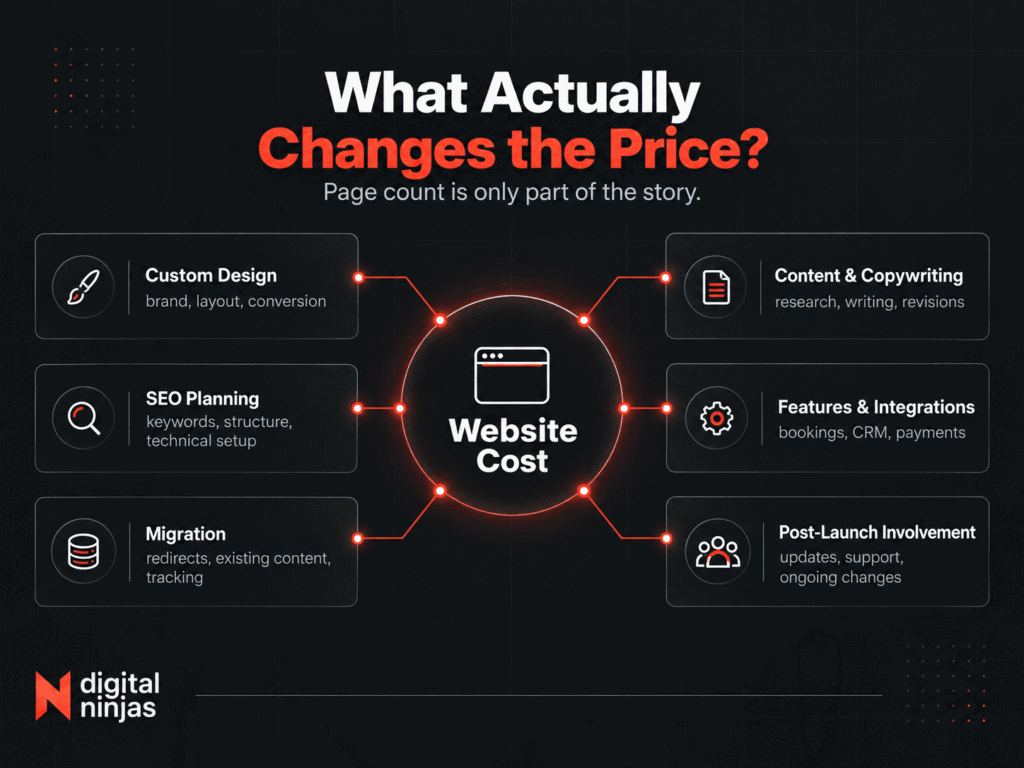
Custom design vs. adapting a template
Starting with an existing theme is faster.
Designing around your brand, content, audience, and conversion goals takes more time.
Neither approach is automatically wrong. You just shouldn’t pay custom-design prices for a lightly edited template.
Content and copywriting
Someone has to write the content for the website.
If you’re supplying polished final copy, the project costs less.
If the team needs to research your audience, clarify your positioning, plan each page, write the copy, revise it with you, and optimize it for search, that’s a separate body of work.
This is one of the most common things left unclear in website proposals.
SEO planning
“SEO included” can mean almost anything.
Sometimes it means installing an SEO plugin and filling in metadata.
A more involved SEO scope may include keyword research, competitor analysis, page mapping, internal linking, technical checks, redirects, structured data, Google Search Console setup, and planning content around actual search demand.
Ask what’s included instead of relying on the label.
If you want a baseline for what search-friendly fundamentals actually look like, Google’s SEO Starter Guide is a useful reference.
Features and integrations
A brochure website is usually simpler than a site that needs bookings, payments, membership features, a product catalog, CRM integration, lead automation, multilingual content, or custom workflows.
Every external system adds something that needs to be configured, tested, and maintained.
Migration
Replacing an existing website can be more complicated than launching a brand-new one.
You may have old URLs that already rank, years of blog content, analytics setups, forms, tracking scripts, customer data, or integrations that shouldn’t disappear during the move.
Migration work is often invisible when everything goes right.
That’s exactly why it matters.
How involved you want to be after launch
Some businesses want the keys and prefer to manage everything internally.
Others don’t want to think about hosting, updates, website changes, content, or SEO after launch.
Those are different services, so they should have different prices.
Want to see what Digital Ninjas includes instead of comparing vague quotes? View our website plans.
Don’t forget the costs after the website launches
The initial build gets most of the attention when businesses compare website costs, but it isn’t necessarily the last number you’ll pay.
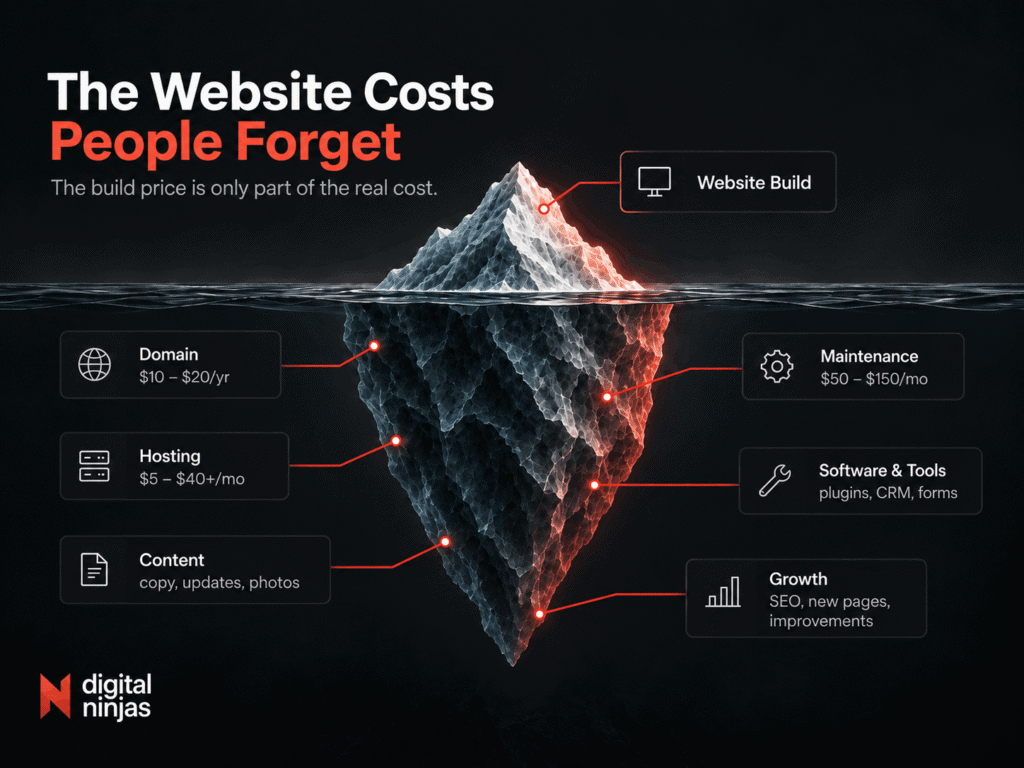
Domain
A normal domain usually costs a relatively small amount each year, although premium names and some extensions can cost considerably more.
The important part is ownership. Your business should control its domain account.
Hosting
Basic shared hosting can be inexpensive. Managed hosting, higher-performance infrastructure, e-commerce hosting, or larger applications cost more.
Don’t compare hosting on price alone. Reliability, support, backups, security, and performance matter too.
Maintenance and support
Software changes. Browsers change. Plugins change. Content gets outdated. Things occasionally break.
Some businesses handle maintenance internally. Others pay a monthly care plan or ongoing support agreement.
Ask about this before launch, not after something stops working.
Content
A finished website is not necessarily finished marketing.
If search visibility matters, you may need new service pages, case studies, landing pages, articles, updated photography, or other content over time.
That isn’t a flaw in the website. A growing business rarely stays exactly the same after launch. Your website needs to keep up.
Third-party tools
Booking systems, email platforms, premium plugins, analytics products, CRMs, form tools, and other software may have their own subscriptions.
Make sure you know which ones are included in your website quote and which ones you will pay directly.
When is a monthly website plan worth it?
A monthly website plan makes the most sense when you need more than a website launch.
If your business also needs hosting, maintenance, content updates, SEO work, reporting, and someone available when something needs fixing, bundling those services into one monthly plan can be simpler than hiring different people for each job.
The key is to compare the total cost and total scope, not just the first invoice.
A $3,000 website paid upfront may look cheaper than a $499 monthly plan. But if you later add hosting, maintenance, SEO, content, support, and ongoing improvements, you’re no longer comparing the same service.
At Digital Ninjas, our Website-as-a-Service plans currently start at $499 per month plus a $250 setup fee, with a 12-month minimum. The Starter plan combines the website build with hosting, SEO foundations, ongoing content, maintenance, reporting, and support.
That model can be a good fit if:
- your website is expected to generate leads rather than simply exist
- you don’t have an internal person handling updates and technical issues
- SEO and content are part of your long-term marketing plan
- you prefer predictable monthly costs over separate invoices
- you want the site to keep improving after launch
A traditional one-time build may make more sense if your needs are simple, you already have people handling SEO and content, or you’re comfortable maintaining the site internally.
Whichever model you’re considering, check the contract before comparing prices.
Ask:
- How long is the commitment?
- What work is included each month?
- Are hosting and maintenance included?
- Who owns the website and content?
- Can the website be moved if the agreement ends?
- What happens when you need work outside the monthly scope?
Those answers matter just as much as the monthly fee. They should be clear before you sign anything.
The cheapest-looking option isn’t always the lowest website cost over time. The better comparison is what you’re paying for, how much work your team still has to handle, and whether the arrangement fits the way your business plans to use the site.
So what should you actually spend on a website?
When you’re asking “how much does a website cost?”, it also helps to ask what you expect that website to do for the business.
Start with the job the website needs to do.
If you mostly need somewhere credible to send referrals so they can check your services and contact you, you may not need a complex build.
If the website is expected to generate leads, support search visibility, publish content regularly, integrate with your sales process, and become a serious acquisition channel, the scope changes.
So does the budget.
One useful question is:
If this website generated one additional good client each month, what would that be worth to the business over a year?
That doesn’t mean you should blindly spend that amount.
It gives you a better reference point than comparing every proposal with the cheapest quote in your inbox.
There’s also nothing wrong with starting lean.
A new business can begin with a focused site and expand when the demand is there. The important part is choosing a setup that won’t make every future improvement unnecessarily difficult.
If you’re still deciding whether your business needs a dedicated website in the first place, read our guide on why a business website still matters.
Website Cost FAQ
Can I get a professional website for under $1,000?
Yes, but the scope will usually be limited.
At that budget, you’re more likely to get a template-based site, a small number of pages, or a tightly defined build from a freelancer. Custom strategy, copywriting, deeper SEO work, complex integrations, and ongoing support may cost extra.
Before choosing based on price alone, ask exactly what’s included and what you’ll need to provide yourself.
How long does it take to build a small business website?
It depends on the scope and how ready the content is.
A straightforward small business website can take a few weeks, while a larger custom site may take several months. Content, feedback, integrations, and approval rounds often affect the timeline just as much as the actual development work. Current web-design guides commonly place simpler business sites within a several-week range, with more complex projects taking longer.
Ask for a realistic project timeline before work begins, including what your team needs to provide and when.
Do I own my website after it’s built?
That depends on the agreement, so check before signing.
Ask who owns the domain, website content, design assets, code, and hosting account, and what happens if you stop working with the provider.
With Digital Ninjas, the content, design, and work created for the client belongs to the client. For Website-as-a-Service plans, content can also be exported and handed over if the service ends after the agreed terms.
How much does a website cost to maintain each year?
For a simple small business website, the basic recurring costs can stay in the hundreds of dollars per year if you handle most maintenance yourself.
Professional support, premium tools, content creation, SEO, hosting, and regular improvements can push the annual cost into the thousands.
The important distinction is whether you’re budgeting only to keep the website running or paying someone to keep improving it.